CapCut Professional Review 2026: Worth It, Plus Alternatives
We tested CapCut Pro 2026 pricing, AI tools and the new TikTok ownership deal, then compared it to Descript, Premiere and Argil. Full verdict inside.
- capcut professional is the paid tier of CapCut, now run through the TikTok US joint venture that closed in January 2026, with ByteDance down to a 19.9 percent stake
- CapCut Pro costs 19.99 dollars a month or 179.99 dollars a year, and now bundles 1200 monthly AI credits (up from 550) and 1TB of cloud storage (up from 100GB)
- Pro adds a brand kit, custom fonts, background remover, and a commercial license
- Pro removes the editing friction but never removes the filming step
- Alternatives split into editor-replacements and editor-skippers
- Argil skips editing entirely by generating videos from your AI clone
CapCut Professional Review 2026: Worth It, Plus Alternatives
There are usually 2 things that push someone to capcut professional. The free tier slapped a watermark on a client deliverable they already promised, or the background remover finally cost them an hour they did not have. Both are reasonable reasons to pay. The harder question is whether the paid tier fixes the thing actually slowing you down, or whether it just polishes a workflow you would be better off leaving behind.
This is an honest read on what the CapCut Pro upgrade actually buys you, plus the alternatives worth weighing. The alternatives fall into 2 camps, and which camp you belong in depends on whether your problem is the edit or the entire production model.
The quick verdict
CapCut Pro is worth it if you already film daily and the free tier's watermark, weak background remover or missing commercial license is costing you real work. At 19.99 dollars a month it is still cheaper than Premiere or Final Cut, and the 2026 refresh added more AI credits and storage headroom on top. The ownership question most people ask about is also settled now: the TikTok US joint venture closed on 22 January 2026, and ByteDance's stake dropped to a minority 19.9 percent with no board control.
If your actual bottleneck is finding time to film in the first place, CapCut Pro will not fix that, and you should skip ahead to the alternatives. Argil is the pick built for exactly that problem.
What CapCut Pro is and who makes it
CapCut Pro is the paid tier of CapCut, the mobile and desktop video editor built by ByteDance, the same parent company behind TikTok. The ownership question that worried creators through 2025, after CapCut was briefly pulled from US app stores over data-policy concerns, now has a concrete answer. The TikTok US joint venture deal closed on 22 January 2026, moving control of the US business to a new entity. Oracle, Silver Lake and MGX hold 15 percent each, affiliates of existing ByteDance investors hold just over 30 percent, and ByteDance kept a 19.9 percent minority stake plus one seat on a seven-member, majority-American board. The same safeguards cover CapCut and Lemon8. Oracle now oversees storage of US user data and the new US entity owns content moderation, though the ByteDance-controlled global business still runs e-commerce, advertising and marketing on the US app. The history is worth knowing but no longer an open question.
For most creators, CapCut Pro is simply the natural upgrade path. It is the tool TikTok and Reels editors reach for once they outgrow the free version. The promise of this review is straightforward: an honest take on whether that upgrade is worth it, and the alternatives that might serve you better.
How CapCut Pro works and what you actually get
The free tier already covers basic editing. The upgrade is about the delta, so here is what Pro actually adds.
Brand kit and custom fonts
The brand kit stores your logo, your color palette and your fonts in one place, so you can reuse the look across edits without rebuilding it every time. Custom font upload is the one that matters most for agencies, because client brand guidelines almost always demand a typeface CapCut does not ship by default.
The honest caveat is that the brand kit only earns its keep if you are editing more than a handful of videos a week. For occasional posting, it is a feature you will rarely open.

Media kits present your brand professionally and leave a strong impression on collaborators. Image source: CapCut
Background remover and AI tools
The one-tap background remover is genuinely good on clean subjects against simple backdrops. It artefacts on hair and on transparent or fast-moving objects, so do not expect a green-screen replacement for complex shots.
CapCut also ships a script-to-video AI tool, free rather than Pro-only. It assembles stock and text into a rough video, but it does not produce your face, which is the limitation people most often misunderstand. Auto captions and AI voice round out the kit, accurate enough for clear English and weaker on strong accents and slang. The 2026 Pro refresh raised the monthly AI credit allowance from 550 to 1200 and expanded cloud storage from 100GB to 1TB, which matters if you lean on the AI tools daily or keep a backlog of raw footage in the cloud.
Stock library, longer exports, watermark removal
Pro opens the expanded stock library of music, b-roll and overlays you cannot touch on free. It raises the export ceiling too: longer projects at higher resolution, with a cloud render queue for the heavier jobs. Watermark removal applies across template-based and AI-generated exports, which is the feature most paid creators actually came for.
Commercial license
This is the important one. The free tier license breaks down the moment your video becomes paid content, whether that is an ad or branded UGC. Pro includes a commercial license that covers most of that. The catch is that some music tracks and third-party fonts stay license-restricted even on Pro, so run a quick asset-level license check before any branded delivery rather than assuming the subscription covers everything.
Pricing and plans
Here is the current pricing, verified against CapCut's live plans.
Free tier
The free tier is genuinely usable. You get the core editor and templates with real exports, though some flows still carry a watermark. What forces the upgrade is a narrow set of features: the better background remover, the brand kit and custom fonts, and the commercial license. If none of those touch your work, free is fine.
Standard, Pro monthly and annual
CapCut Pro costs 19.99 dollars a month, or 179.99 dollars a year, which works out to roughly 15 dollars a month on the annual plan. CapCut also introduced a Standard tier below Pro, aimed at editing enthusiasts rather than professionals, with a narrower toolkit than Pro. CapCut does not publish the Standard price on its own site and says subscription pricing varies by region, device and promotion, so read the figure in the app before you commit. The annual gap on Pro is meaningful if you know you will keep using it, and there is a free trial you can cancel before billing if you decide it is not for you.
Team and commercial tier
The team plan adds a shared brand kit and asset library across multiple seats, priced at roughly 15 to 30 dollars a seat a month on annual billing, depending on headcount and region. Be honest about what it is, though. It is sparse compared to a true team editor, and anyone needing real collaborative workflows will feel the gap fast.
Where CapCut Pro is genuinely strong
This is the part where the upgrade earns its money, assuming you fit the profile.
- Speed: it is still the fastest mobile editor for short-form when you already film daily.
- Trend-fit: native TikTok integration, a current template library, and a sound library tied to platform trends.
- Cost per video: low if you ship volume and already enjoy editing.
- Mobile-first workflow: shoot, cut, caption, and export from a phone in one session.
- Learning curve: shorter than Premiere or Final Cut, which matters for creators who do not want to learn a desktop NLE.
For a fair view of how it stacks against the rest of the short-form field, this breakdown of clipping software for content creators covers the editor camp in depth.
Where CapCut Pro hits its ceiling
Be honest with yourself here, because this is where the alternatives start to make sense.
- Time floor: you still have to film. Pro does nothing about the filming bottleneck.
- Render limits: the export queue and cloud render can choke on busy days, especially for longer 4K projects.
- Watermark edge cases: some AI-generated clips and template stock still ship with attribution or watermark fragments.
- Ownership residue: the joint venture resolved the headline risk, but ByteDance still licenses its recommendation algorithm to the new entity, so regulated industries should treat the history as recent rather than closed.
- Asset depth: a real gap against Descript or full Adobe Creative Cloud for anyone shooting longer-form.
Who CapCut Pro is actually best for
So here is the actual verdict, in full.
CapCut Pro is best for solo creators shipping 5 or more short-form videos a week who already film daily, for mobile-first editors who refuse to learn Premiere or Final Cut, and for small agencies that need a brand kit and a commercial license at a low monthly cost. It is the wrong tool for anyone bottlenecked by filming time rather than editing time. If you cannot find the hours to record, a better editor does not help you.
Best CapCut Pro alternatives, in 2 camps
The alternatives split cleanly into 2 camps. Editor-replacements keep you editing, just somewhere better. Editor-skippers remove editing from your life entirely. Knowing which camp you need saves you from trialing 6 tools that solve the wrong problem. For a side-by-side on the other ban-era alternatives, see this roundup of the top CapCut alternatives for 2026. For a deeper look at the avatar side, this guide to the best AI avatar services for influencer content maps the editor-skipper field.
Editor-replacement camp: Descript
Descript lets you edit video by editing the transcript, which makes cuts fast and forgiving. Its AI cleanup tools are strong, and it is a natural fit for podcasts and longer YouTube content.
The limitations are real for short-form creators. It is weaker on vertical video and carries a steeper curve for mobile-first editors, with fewer of the trend-style templates short-form leans on. Descript pricing starts at 16 dollars a month on the Hobbyist plan, with Creator at 24 dollars, both on annual billing. Long-form YouTube and podcast creators who want a smarter, less manual editor get the most out of it.
Editor-replacement camp: Adobe Premiere
If you live in the Adobe ecosystem, this used to mean Premiere Rush. Adobe is retiring Premiere Rush on 30 September 2026 and replacing it with Premiere on iPhone and Premiere on desktop, with the mobile version free and watermark-free for core editing.
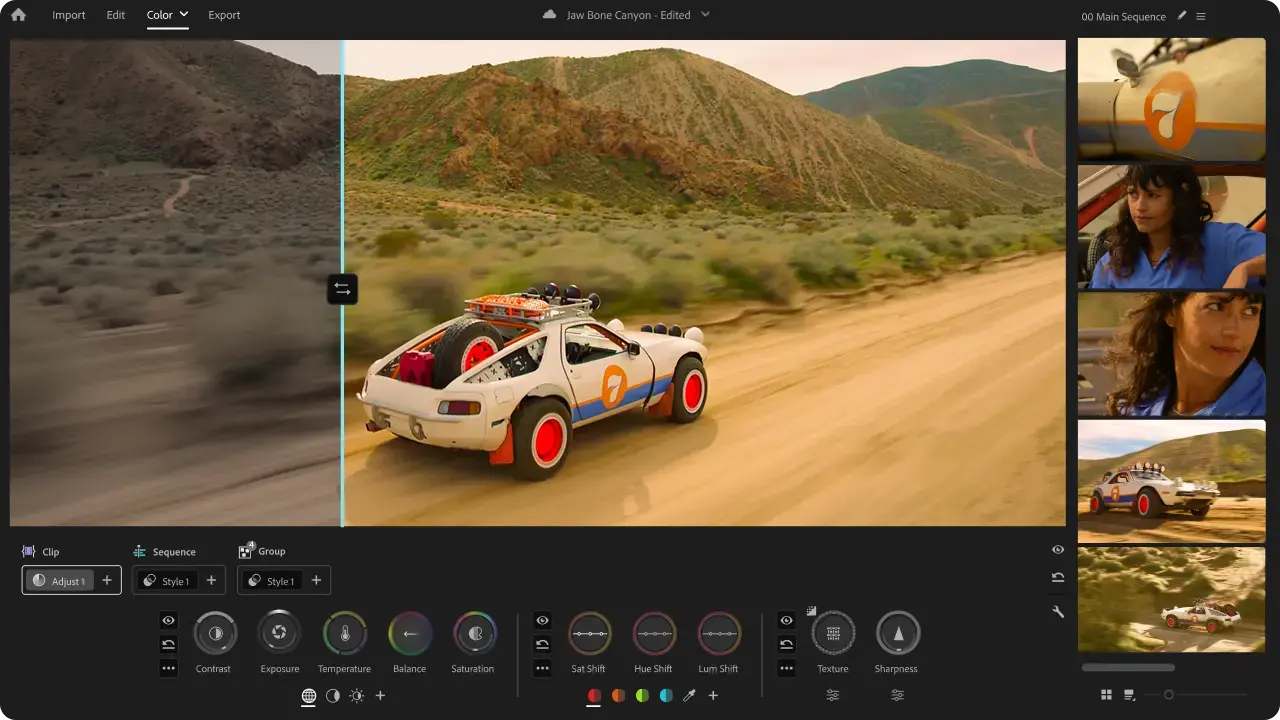
Image source: Adobe Premiere Pro
The strength is full Adobe asset compatibility and true color grading, with clean cross-device sync between phone and desktop. The limitations are that it is slower for snappy trend edits and offers fewer one-tap effects than CapCut. It is best for creators already inside Creative Cloud who want CapCut-style speed without leaving Adobe.
Editor-skipper camp: Argil (leading pick)
Argil is the leading editor-skipper because it removes the 2 bottlenecks CapCut Pro never touches: filming time and editing time. You build a personal avatar from a photo of yourself, and from then on you generate short-form videos straight from a script. Auto-captions and auto b-rolls are toggles on the script screen, so the pipeline populates both for you and you only step in where you want something changed. For the mechanics behind that, here is how the AI clone matching actually works in Argil.
The trade-off is honest. Argil is not a manual editor, so if you want to micro-edit every cut, it is the wrong fit. It works best when an expert user feeds it sharp scripts and angles, which is also why it suits creators with real domain knowledge. Argil's plans are tiered by monthly credit allowance, with credits refreshing each month rather than stacking, so what you pay tracks how much video you generate. The fit is solo creators and personal brands, plus the real estate agents, lawyers and SMBs who want to post daily without filming daily. For anyone evaluating the avatar field broadly, this comparison of how leading AI avatar services compare on pricing is a useful next step.
Editor-skipper camp: Synthesia
Synthesia offers a large stock-avatar library and strong multilingual output, which makes it well suited to B2B training and internal video. Synthesia pricing starts at 29 dollars a month on the Starter plan, with Pro at 89 dollars.
The limitation for creators is that stock avatars do not build a personal brand, and the short-form pipeline feels weaker and less native to social. It suits B2B teams producing training, sales or onboarding video across many languages.
Editor-skipper camp: HeyGen
HeyGen delivers high-fidelity avatars and broad language support, with decent personal cloning and a Creator plan at 29 dollars a month. Its editing pipeline is less polished than Argil for short-form social, and the product leans more sales and marketing flavored. The multilingual angle is its real strength, the same one explored in this guide to AI video translation across languages. Marketing teams and sales reps localizing outreach video at scale are who it is built for.
Which should you actually choose
The right pick comes down to which bottleneck is actually yours.
If filming is fun and you ship daily, CapCut Pro stays. If editing is the bottleneck but you love filming, go to Descript or Adobe Premiere. If filming itself is the bottleneck and you want your own face on every video, Argil, and building a brand around that recurring face is a skill worth learning from day one rather than bolting on later. If you do not need your own face and you serve B2B across many languages, Synthesia or HeyGen. CapCut professional exists to remove editing friction, so when your real friction is filming, none of these editors solves the problem you have.
FAQ
Is CapCut Pro worth it in 2026?
Worth it if you film and edit regularly and want a brand kit, custom fonts, more AI credits and watermark removal bundled with commercial licensing in one cheap stack at 19.99 dollars a month. If filming is your real blocker, the upgrade does not solve your problem.
What is the difference between CapCut free and CapCut Pro?
Free covers the basic editor and templates. Pro adds the brand kit and the better background remover, custom fonts and a larger asset library, 1200 monthly AI credits, 1TB of cloud storage, longer and higher-resolution exports, and a commercial license on top.
Can I use CapCut Pro videos for commercial work?
Yes, with caveats. The Pro tier includes a commercial license, but some music tracks and third-party fonts stay restricted. Always check the asset-level license before shipping branded work.
What is the best alternative to CapCut Pro?
It depends on the bottleneck. For better editing, Descript or Adobe Premiere. For skipping editing entirely with your own face, Argil. For stock-avatar B2B output, Synthesia or HeyGen.
Is CapCut safe to use now that the TikTok ownership issue is resolved?
Largely yes. The TikTok US joint venture closed on 22 January 2026, cutting ByteDance's stake to a minority 19.9 percent with no board control and moving data storage and moderation to the new US entity. If your organisation has a strict data-policy requirement, confirm the current terms directly, since ByteDance still licenses the underlying algorithm.
Can AI tools fully replace CapCut Pro?
For creators who want their own face on daily content without filming every day, yes. Tools like Argil generate fully edited videos from a script using your AI clone, removing the filming step CapCut Pro cannot touch. For motion-heavy or location-based work, you still need a real editor.
Related Articles
- Top CapCut Alternatives and Best Video Editors for 2026
- Which AI Avatar Platform Is Easiest to Use in 2026
- Best AI Avatar Services for Multilingual Marketing Campaigns
- What Is FlexClip and How Does It Stack Up Against Argil
CapCut professional review and the alternatives that skip editing entirely